Posts

UB-Xa VX Editor for Mac and PC

Image
Update  - UB-Xa VX Editor Just a cosmetic update with a better layout that fits on 2 screens. Everything needed to edit a patch is now on the first screen. The second is for Atrophy and Globals. Enjoy!   Mac versions were built on an iMac running Catalina. Plugins tested with Live 10, Logic 10.6 and Cubase LE 10.5. The plugins were compiled using Reaper. Users report that the standalone app works on later M1 Macs but the  plugins do not. I will try and test this update on an M2 if I can get access to one. Some Silicon users have left some useful comments: Jump to comments   PC version is standalone only and has been tested on Windows 10 and 11. But Windows 11 now supports Mutli Client Midi you can run the editor and still use the same MIDI ports in your sequencer without conflicts. This is a game changer for Windows and MIDI. Downloads All files have been scanned with AVG Antivirus. The UB-Xa VX editor is free and comes with no warranties. Play at your own...

Oberheim TEO-5 Editor

Image
Oberheim TEO-5 Editor CTRLR Editor for TEO-5 New Version VX  with everything you need to edit a patch on one page!  Improved Screen Layout   Mac versions were built on an iMac running Catalina. Plugins tested with Live 10, Logic 10.6 and Cubase LE 10.5. The plugins were compiled using Reaper. Users report that the standalone app works on later M1 Macs but the  plugins do not. YMMV   PC version is standalone only and has been tested on Windows 10 and 11.   Standalone Versions - if you are running these alongside your sequencer or DAW do not leave the MIDI track that is sending to the TEO in record mode or armed while using the editor. This will confuse the synth as the TEO will echo SysEx info to the editor and to the sequencer. So this is the rule: when using the editor turn off record for that track  in your sequence.   Oberheim TEO-5 Standalone Editors    TEO-5 VX PC Standalone     TEO-5 VX Mac Standalone   ...

CV to MIDI Interface for Analogue Sequencer

Image
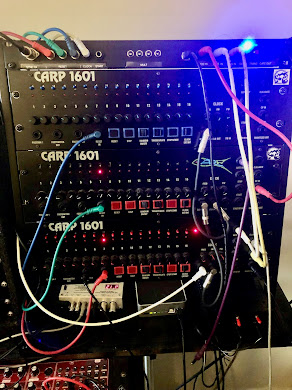
This is another project based on Arduino and the Pro Micro. Many years ago with the help of friend and fellow musician/programmer, Linden Owen, we produced the CARP1601. This was very loosely based on the ARP1601 analogue sequencer. It was never commercially viable due to the high component count and the cost of those components. 19 pots, 19 knobs, 17 LEDs, 24 switches, 15 jack sockets and then add on PCB, components case and PSU. Anyway, it was a fun project! Note this project will work with any analogue sequencer that has Gate and CV outputs. Voltages may need to be scaled in the sketch using the map function. 3 CARP 1601s with the SYNC24 and MIDI Interface We built about 6 in the end, sold a couple and I was left with 3 units that I have used constantly for more than 20 years. In 2022 I decided to make some improvements mainly to the gate switches. But towards the end of the 2022 I realised it would be relatively easy to add a board to the CARP rack that could provide MIDI Out and p...

Synth Editors Mac and PC for Roland etc

Image
Synth Editors standalone and plugin format Mac and PC for Roland RD88, JU06A, SH01A, Oberheim TEO-5, Behringer UB-Xa, TC M350 JU06A : RD-88 : SHO1A : Pro Solo MK3   TC M350 : UB-Xa : TEO-5 I thought it would be useful to create a single post for my CTRLR panels. There are  Mac and a PC versions: Mac Editors tested up to OS 15 Catalina - reports from users that it works on later Macs PC Editors tested and working on Windows 7  and 10 Mac AU component tested in Live 10 and Logic 10.6  Mac VST created in Reaper tested on Cubase AI 10.5 and Live 10 Plugins are not compatible with newer Macs and Mac OS 11 etc. Roland RD-88 Editor   Mac Installation Note : if you get the message that the app is from an unknown developer and can't be opened got the Security panel in System Preferences and grant access:  On Windows you will have to allow it to run because the editor has not been verified by Microsoft. Just select More Info and then follow the prompts.Here is a...

Roland RD88 Editor Panel

Image
Roland RD88 Editor Panel This is a free stand alone editor built using CTRLR. Tested on Mac 10.15  Catalina and Windows 7 and Windows 10. Users tell me that my editors also run on later M1 Macs. Let me know in the comments if you can confirm this. I found a post on VI.Control from a user saying it works fine on his Mac running Sonome. Good to know! Features: Fast recall of all Scene parameters including Common, Tones, Zones and effects Rename scenes - you still have to remember press "Write" to store on RD88 Handy buttons for creation of Splits and Layers Mute buttons for each Tone Over 3000 tones are accessible from the Tone Tabs Standalone versions for Mac and PC  Here's a link to the video demo. RD88 Demo Video Part 1/2 RD88 Demo Video Part 3 Download Links RD-88 Mac RD-88 AU Plugin  does not run in Logic 10.6 RD-88 VST Mac RD-88 PC RD88 editor running as AU component You can edit all the 90 MFX effects BUT I have only added the parameter names and ranges for the ...

Patches and tips for the Behringer 2600

Image
Here are some simple mods and ideas that I have found useful CV and Gate setup - coming soon Ext Clock In - tip Stereo Pan patch Octave + / - patch using filter feedback patch Bandpass patch - coming soon Notch patch- coming soon External Clock Fix    Maffez 2600 Mods   I used one of his mods for the External Clock In. WIthout the mod the External Clock input does not work unless you only push the jack in halfway. Not an ideal soultion as the slightest wiggle and it won't work. But Maffez has a an easy mod for this: Carefully cut the trace with a sharp knife, solder a 1K resistor Auto Pan Patch   After this mod the External Clock input works as expected. Below is an example of using it to sync panning to the external clock or any pulse eg Gate On.  Filter feedback patch   I can't remember who I got this from but it is a very interesting effect. When setup correctly you will hear the pitch shift down by an octave then return to the original pitch. ...

Raspberry Pi as a MIDI Host

Image
 Using the Raspberry Pi as a MIDI Host What is a MIDI host? A MIDI host will allow you to connect 2 USB devices together. Most modern MIDI equipment will have a Type B Midi Socket to allow MIDI transmission to and from the instrument. This is why many newer keyboards do not have 5 pin MIDI sockets and instead use USB to transmit and receive MIDI. This is understandable given many users just use the USB socket to connect to their computer for sequencing etc. The problem is you cannot connect the output of a Type B socket to another Type B. You are expected to connect it to a Type A socket like the ones on your computer. This is where a MIDI Host comes in. You can connect both Type B instruments to the Host and they will talk to each other. The Pi I'm using is blessed with no less then 4 Type A sosckets so it is a perfect choice for a MIDI Host box.       The keyboard I'm using is the Yamaha P121 which is the 73 key version of the P125. As you can see from the rea...

Arduino Pro Micro Projects

Image
The Pro Micro  How to get the projects If you are interested in building any of these projects please contact me for details. I don't supply any parts but you can get the Pro Micro and other parts from eBay etc.  You can contact me via the comments sections. Alternatively,  email me at  gmail - my name is chaz riff but without the space ;) Behringer 2-XM Polyphonic Controller This is the latest project - a four voice controller for the Behringer 2-XM. This is based on the Oberheim SEM which was the synth module that was in the famous FVS (Four Voice Synthesiser) from 1978. This project uses 2 Pro Micros connected via the TX and RX pins. I needed 2 because it requires 32 ins and outs.        FVC connected to 2-XMs More info  here Low Cost Polyphonic Keyboard Controller for mono synths A much simpler and cheaper alternative to the 2-XM controller. Very cheap to build and still has an on board polyphonic ADSR. All controls are handled with CCs f...

2-XM Polyphonic Controller

Image
Behringer 2-XM Polyphonic Controller This was the first iteration of the four voice controller for the Behringer 2-XM. It has now been superceded byt the Eurorack version which supports 10V outputs.    The 2-XM is based on the Oberheim SEM which was the synth module that was in the famous FVS (Four Voice Synthesiser) from 1978. I was lucky enough have one of these (courtesy of the record company!) and used it for live and recording until the mid 80s when it died! I still have one of the modules but the rest is long gone. I had given up all hope of ever replacing it until Behringer announced 2-XM which is a faithful but smaller recreation of the modern SEM (2000s). Each 2-XM is actually 2 SEMS  - can you see why it's called the 2-XM ;)  so if you have 2 units and a controller you would have the equivalent of the mighty FVS. Here is the finished prototype.... FVC connected to 2 x 2-XMs for a four voice system Short demo of the FVC features  2-XM Controller Feature...

Oberheim TEO-5 Editor Manual

Image
 Introduction The TEO-5 editor was built using CTRLR 5.3.198 for Mac and on PC. The Mac versions have been tested on Catalina 10.15 but users of later Macs report it runs as a standalone app on M1 and later. The plugins do not run on Silicon. PC versions have been built on Windows 7 and tested on Windows 10. Special thanks to  RomanKubiak  who developed CTRLR. The editor is free and without warranty. I accept no liability for loss or damage. However, MIDI messages are unlikely your damage your synth and you can always do a firmware reset if you have problems. Installation MIDI Setup Global Settings The editor uses SYSEX and NPRN commands so these must be enabled: 1 Global menu 2 Select the following parameters: 18 - MIDI ParamSend NPRN 19 - MIDI ParamRcv NPRN 20 - MIDI Control On 21 - MIDI Sysex On 22 - MIDI Sysex Cable USB 23 - MIDI Select Out All 24 - MIDI Prog Snd On 25 - MIDI Prog Rcv On Some of these settings are on by default but worth checking.

UB-Xa Editor Manual

Image
 Introduction The Mac versions have been tested on Catalina 10.15 but users of later Macs report it runs as a standalone app on M1 and later. The plugins do not run on Silicon. PC versions have been tested on Windows 10. Special thanks to  RomanKubiak  who developed CTRLR. The editor is free and without warranty. I accept no liability for loss or damage. However, MIDI messages are unlikely your damage your synth and you can always do a factory reset if you have problems. Latest Version =  5.188 UB-Xa PC Standalone UB-Xa Mac Standalone GETTING STARTED Editor Settings The first time you load the editor you need to set the MIDI ports. Use the MIDI menu to select UB-Xa Input on ALL Channels (CH:0) Output on Channel 1 (CH:1).  You may need to click  Refresh Devices in the MIDI menu. Quit and reload the editor if there is no communication as this should also refresh the MIDI ports. You can check MIDI is working by moving a knob on the UBXa.  The correspondin...