Posts

CV to MIDI Interface for Analogue Sequencer
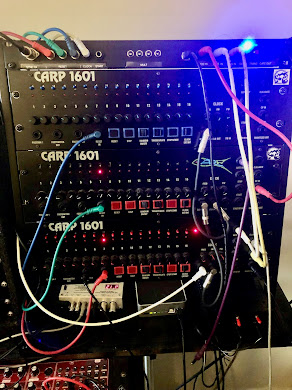
Image
This is another project based on Arduino and the Pro Micro. Many years ago with the help of friend and fellow musician/programmer, Linden Owen, we produced the CARP1601. This was very loosely based on the ARP1601 analogue sequencer. It was never commercially viable due to the high component count and the cost of those components. 19 pots, 19 knobs, 17 LEDs, 24 switches, 15 jack sockets and then add on PCB, components case and PSU. Anyway, it was a fun project! Note this project will work with any analogue sequencer that has Gate and CV outputs. Voltages may need to be scaled in the sketch using the map function. 3 CARP 1601s with the SYNC24 and MIDI Interface We built about 6 in the end, sold a couple and I was left with 3 units that I have used constantly for more than 20 years. In 2022 I decided to make some improvements mainly to the gate switches. But towards the end of the 2022 I realised it would be relatively easy to add a board to the CARP rack that could provide MIDI Out and p...

Arduino Pro Micro Projects

Image
The Pro Micro  How to get the projects If you are interested in building any of these projects please contact me for details. I don't supply any parts but you can get the Pro Micro and other parts from eBay etc.  You can contact me via the comments sections. Alternatively,  email me at  gmail - my name is chaz riff but without the space ;) Behringer 2-XM Polyphonic Controller This is the latest project - a four voice controller for the Behringer 2-XM. This is based on the Oberheim SEM which was the synth module that was in the famous FVS (Four Voice Synthesiser) from 1978. This project uses 2 Pro Micros connected via the TX and RX pins. I needed 2 because it requires 32 ins and outs.        FVC connected to 2-XMs More info  here Low Cost Polyphonic Keyboard Controller for mono synths A much simpler and cheaper alternative to the 2-XM controller. Very cheap to build and still has an on board polyphonic ADSR. All controls are handled with CCs f...

2-XM Polyphonic Controller

Image
Behringer 2-XM Polyphonic Controller This was the first iteration of the four voice controller for the Behringer 2-XM. It has now been superceded byt the Eurorack version which supports 10V outputs.    The 2-XM is based on the Oberheim SEM which was the synth module that was in the famous FVS (Four Voice Synthesiser) from 1978. I was lucky enough have one of these (courtesy of the record company!) and used it for live and recording until the mid 80s when it died! I still have one of the modules but the rest is long gone. I had given up all hope of ever replacing it until Behringer announced 2-XM which is a faithful but smaller recreation of the modern SEM (2000s). Each 2-XM is actually 2 SEMS  - can you see why it's called the 2-XM ;)  so if you have 2 units and a controller you would have the equivalent of the mighty FVS. Here is the finished prototype.... FVC connected to 2 x 2-XMs for a four voice system Short demo of the FVC features  2-XM Controller Feature...

Oberheim TEO-5 Editor Manual

Image
 Introduction The TEO-5 editor was built using CTRLR 5.3.198 for Mac and on PC. The Mac versions have been tested on Catalina 10.15 but users of later Macs report it runs as a standalone app on M1 and later. The plugins do not run on Silicon. PC versions have been built on Windows 7 and tested on Windows 10. Special thanks to  RomanKubiak  who developed CTRLR. The editor is free and without warranty. I accept no liability for loss or damage. However, MIDI messages are unlikely your damage your synth and you can always do a firmware reset if you have problems. Installation MIDI Setup Global Settings The editor uses SYSEX and NPRN commands so these must be enabled: 1 Global menu 2 Select the following parameters: 18 - MIDI ParamSend NPRN 19 - MIDI ParamRcv NPRN 20 - MIDI Control On 21 - MIDI Sysex On 22 - MIDI Sysex Cable USB 23 - MIDI Select Out All 24 - MIDI Prog Snd On 25 - MIDI Prog Rcv On Some of these settings are on by default but worth checking.

UB-Xa Editor Manual

Image
 Introduction The Mac versions have been tested on Catalina 10.15 but users of later Macs report it runs as a standalone app on M1 and later. The plugins do not run on Silicon. PC versions have been tested on Windows 10. Special thanks to  RomanKubiak  who developed CTRLR. The editor is free and without warranty. I accept no liability for loss or damage. However, MIDI messages are unlikely your damage your synth and you can always do a factory reset if you have problems. Latest Version =  5.188 UB-Xa PC Standalone UB-Xa Mac Standalone GETTING STARTED Editor Settings The first time you load the editor you need to set the MIDI ports. Use the MIDI menu to select UB-Xa Input on ALL Channels (CH:0) Output on Channel 1 (CH:1).  You may need to click  Refresh Devices in the MIDI menu. Quit and reload the editor if there is no communication as this should also refresh the MIDI ports. You can check MIDI is working by moving a knob on the UBXa.  The correspondin...

Emulator X3 - a forgotten gem

Image
 E-mu the company - Emulator the sampler No need to cover the background and history behind E-mu but I will quote this anecdote: Dave Rossum and Scott Wedge were the founders of E-mu and by 1980 they had a prototype Emulator 1 but still didn't have a name for it other than the sampler. So one day Rossum asked everyone to go home and come back the next day with some ideas. Ed Rudnick came in the next day with a big smile on his face and announced that he had found the name Emulator. He had found it after looking through the thesaurus. Considering the match with the company name it was amazing and Wedge said a lot of people thought the name of the company was Emulator. Links Emulator Archive     The Emulator Archive was founded in July 1999 to preserve the legacy of music technology created by E-mu Systems. The Emulator Archive has comprehensive information on all vintage E-mu Systems products to enable owners to continue to enjoy the amazing technology, and to create new m...

Roland RD88 Editor Panel

Image
Roland RD88 Editor Panel This is a free stand alone editor built using CTRLR. Tested on Mac 10.15  Catalina and Windows 7 and Windows 10. Users tell me that my editors also run on later M1 Macs. Let me know in the comments if you can confirm this. I found a post on VI.Control from a user saying it works fine on his Mac running Sonome. Good to know! Features: Fast recall of all Scene parameters including Common, Tones, Zones and effects Rename scenes - you still have to remember press "Write" to store on RD88 Handy buttons for creation of Splits and Layers Mute buttons for each Tone Over 3000 tones are accessible from the Tone Tabs Standalone versions for Mac and PC  Here's a link to the video demo. RD88 Demo Video Part 1/2 RD88 Demo Video Part 3 Download Links RD-88 Mac RD-88 AU Plugin  does not run in Logic 10.6 RD-88 VST Mac RD-88 PC RD88 editor running as AU component You can edit all the 90 MFX effects BUT I have only added the parameter names and ranges for the ...

UB-Xa Editor V1 - Discontinued

Image
UB-Xa Edit V2 - DISCONTINUED  Update - new version is here  UB-Xa V5 ARCHIVED Behringer have just released a firmware update V2.0 ( 000.003.117).  This includes new features which changes some of the Sysex Data. Latest version is 1.63and has a couple of important bug fixes that were affecting Local Control menu. This release has an updated Atrophy Page and code so Presets will recall stored Atrophy settings.  Version 1 - History Patch Editor Matrix Editor New Atrophy Page Windows Version Setup: The App is not signed so Mac Gatekeeper will probably throw up a dialog that this is from an unknown developer. Just load Security and Privacy from System Preferences and select Open Anyway. You only have to this on first run. From the MIDI menu set you MIDI IO.  You may need to reload the app so the MIDI devices are refreshed: MIDI IN = UB-Xa MIDI OUT = UB-Xa CONTROLLER = NONE The editor uses NRPN messages so you need enable these in the UB-Xa menus. The editor will auto...

MIDI Organ Drawbars

Image
MIDI Organ Drawbars   When Guido Scognamiglio (Zioguido, GSi) released the D9U drawbard kit on GM-Lab I ordered the kit and built it. It was my first experience of the programming an Arduino Pro Micro and thanks to his excellent code I was able to modify and improve the unit. I then went on to build many projects based on the Pro Micro. GM-LAB I sold the D9U then picked up a set of old Hammond MIDI drawbars so I was able to build a unit based on Guido's design. One thing I didn't like about the D9U was the tiny micro switch at the back of the unit. This was used to switch between 2 sets of drawbars. I realised that it would be easy to use a rotary switch instead and then change the code to allow the adjustment of 4 sets of drawbars. Th CCs for the drawbars are stored in an array: int CCMap[4][9] = { { 12, 13, 14, 15, 16, 17, 18, 19, 20},  // Upper B { 40, 41, 42, 43, 44, 45, 46, 47, 48 },  //  Upper A { 80, 81, 82, 83, 84, 85, 86, 87, 88 },  // Lower B { 50...

Keydown weights Nord etc.

Image
The Nord Electro 6D has a Fatar TP/80 keybed which is the same as organs like the Mojo 61. However, I was surprised at how stiff the action was. I ended up swapping the key springs with an M-Audio Keystation 61-ES. I think this might use the Fatar TP/9 synth keybed.  That reduced the Keydown by 10g - not huge but it feels a lot better for smears etc. The Prophet 6 uses a variant of the TP/9 There has been much interest in the UB-Xa and some people are unhappy with the lightness of the keyboard so here are my unscientific results: Model No 1ps 3.56g Weight in grams needed to move key from rest White Key Length mm C-C 1 octave mm Nord E6D 15p 53 To the LH edge of the C key Prophet 6 14p 49 136 164 UB-Xa 8p 29 136 164 Behringer Odyssey 6p 21 138 164 So the Electro  with  new springs is very close to the Prophet 6 but the UB-Xa is 20g lighter than the P6. It would definitely be worth replacing the springs if they are the same size as Fatars. They are easy to replace - just ca...